Create a Firebase Service Account Key
Learn how to create a Firebase service account key in minutes and use it to initialise firebase-admin in Node.js
In this tutorial, you will learn:
- How to create a service account key from the Firebase console.
- How to set up
firebase-adminwith the service account key in Node.js.
Step 1 — Create the Key in the Firebase Console
Go into the Firebase console and click on the Settings cog in the top left corner, next to Project Overview:
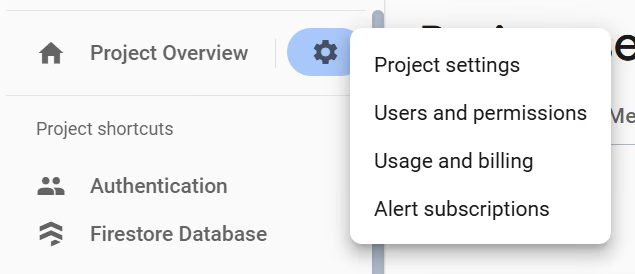
Click on the Project settings option and go to Service accounts on the following page:
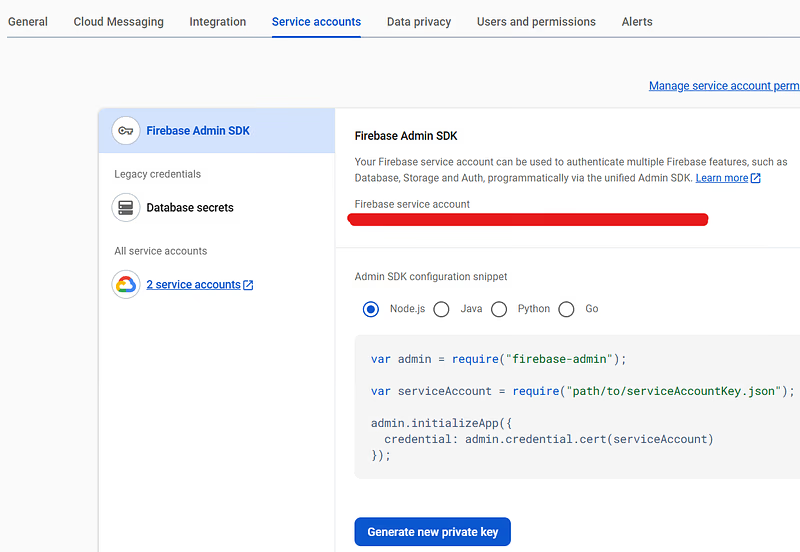
Leave Node.js checked, and hit the Generate new private key button. A warning will appear, instructing you to keep the key confidential. Click through it, and the key will be downloaded to your machine. You should see it in your downloads folder.
Will This Overwrite a Previous Key?
No! It won’t. If you have a previous key in production, don’t worry, it won’t be invalidated when you generate another.
Step 2 — Use the Key in Firebase Admin
Move the file to your Node.js project and paste it in the root. Rename it to:
mv <your-downloaded-key-name>.json serviceAccountKey.jsonThis isn’t necessary, but it makes life simpler. If you haven’t got firebase-admin, install it with:
npm installl firebase-adminTo authenticate your firebase-admin client you can initialise it with your serviceAccountKey.json like so:
import * as admin from "firebase-admin";
// OR
import admin from "firebase-admin";
// Depending on how the module is unpacked. Sometimes it's wrapped.
// Sometimes it isn't. If one import version isn't working, try the other.

const serviceAccountKey = require("path/to/serviceAccountKey.json");
const firebaseAdminCredential = admin.credential.cert(serviceAccountKey);

admin.initializeApp({
  credential: firebaseAdminCredential,
});
That’s it! You can now use the firebase-admin API to your heart’s content.
Final Words
Every time I take a month’s break from Firebase, I need a good 30 minutes to remind myself how this works. When I’m trying to move fast and build a power user npm script, it’s immensely frustrating. Hopefully, this removes the pain for us all 😅 Happy Firebase’ing!