Fix CollectionGroup Query: “Missing or insufficient permissions”
Learn how to update your Firestore rules to allow secure CollectionGroup queries across your Firestore database.
This tutorial will show you how to deal with the following errors:
@firebase/firestore: Firestore (10.12.1): Uncaught Error in snapshot listener: FirebaseError: [code=permission-denied]: Missing or insufficient permissions.
and
Uncaught (in promise) FirebaseError: Missing or insufficient permissions.
An annoying problem when you’re querying using collectionGroups. You can resolve them with changes to your Firestore rules. Let’s see how.
Step 1 — Go to your Firestore Rules page
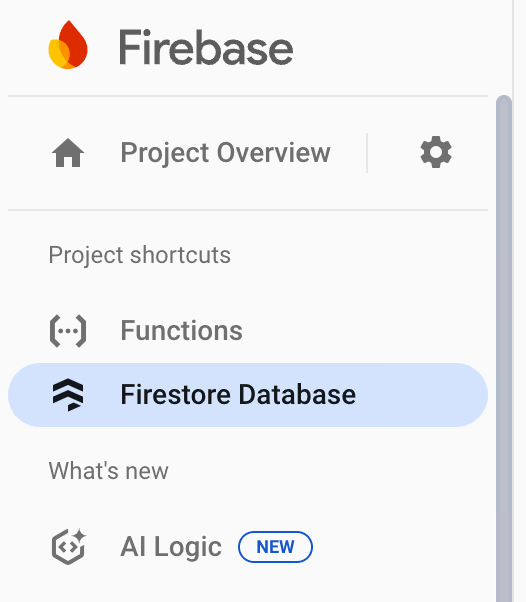
First, check your current rules. You can do this, by visiting the Firebase console and clicking on Firestore Database in the left-hand side bar:
This will open the Firestore page, select the Rules tab:
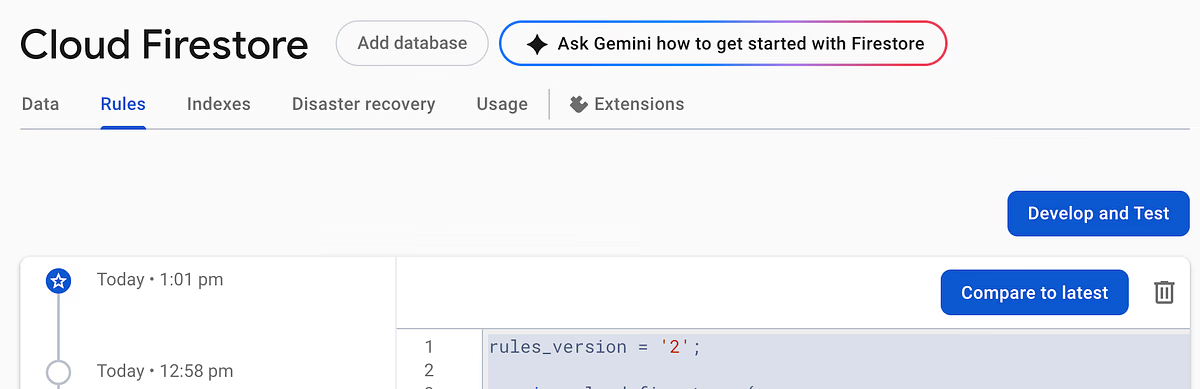
From here, you’ll be able to see your current and historical Rules. As an example, your rules might look like this:
rules_version = '2';

service cloud.firestore {
  match /databases/{database}/documents {
    match /orgs/{orgId}/{document=**} {
      allow read, write: if request.auth.token.userOrg == orgId;
    }
  }
}
This rule says the following:
match /databases/{database}/documents—_ For all Firestore databases in the project._match /orgs/{orgId}/{document=**}— For all documents contained within theorg_ in the _orgs_ collection with _orgId_._allow read, write: if (...)— Allow read and write access to the document if the condition is met.request.auth.token.userOrg == orgId— Check the custom claimuserOrg_ provided in the authentication token matches the _orgId_ value for the specific _org_ within the _orgs_ collection._
In simple terms:
Only allows users to read and write information in an organisation they’re authenticated for.
Step 2 — Add a Specific Collection Group Rule
Before I show you the rule, let’s imagine a scenario.
Imaginary Firestore Structure
Starting from the rule in Step 1, where we have a collection of orgs, let’s say each org in the orgs collection is structured like this:
{
  id: string,
  projects: collection(project),
}
We have an id, and a subcollection called projects on every organisation. Next, image each project in the projects is structured like this:
{
  id: string,
  orgId: string,
  tasks: collection(tasks)
}
Lovely. So we’re storing the project id, the orgId, and we have a subcollection of tasks on every project. Finally, imagine tasks looks like this:
{
  id: string,
  orgId: string,
  projectId: string,
  someValue: number,
}
Say we wanted to get every task in an org which has someValue above 100. The most effective way to do this is with a collectionGroup, and we’re getting errors!
How To Allow Secure Access
With the current Firestore rules, queries like this will fail:
const tasksQuery = query(collectionGroup(db, "tasks"));
const tasks = await getDocs(tasksQuery);
Because each org has a projects collection and each project has a tasks collection. This means our collectionGroup can be spread over multiple orgs. Our initial rule says no reads in orgs that the user isn’t part of, and because Firestore can see the query could _potentially_ go across multiple organisations, the query is rejected.
To get around this, the documentation is clear:
In your security rules, you must explicitly allow collection group queries by writing a rule for the collection group
The simplest way to do this is to add the following rule:
// Allows collection group queries across organisations
match /{path=**}/tasks/{task} {
  allow read: if request.auth != null;
}
All this requires is the auth header in the token to be set to _something_, and you’re allowed through (assuming you don’t fall afoul of the pre-existing rule). Adapt the rule for your use case and republish. You should now be able to access your Firestore data via a collectionGroup!
Being a Bit More Secure
This is nice, but now we’re relying on the pre-existing Firestore Rule to remain unchanged to do our blocking for us. If someone removes our initial rule, any user can access any task on any organisation. Let’s prevent this with a slightly better rule:
// Allows collection group queries across organisations
match /{path=**}/tasks/{task} {
  allow read: if request.auth.token.userOrg == resource.data.orgId;
}
In this version of the rule, we’re double-checking the orgId on the task matches the userOrg on the authentication token before returning the data. That makes this rule secure with or without our pre-existing one.
Step 3 — Adding a Search Index
If you’re changes don’t work straight away and you see an error like the following:
@firebase/firestore: Firestore (10.12.1): Uncaught Error in snapshot listener: FirebaseError: [code=failed-precondition]: The query requires a COLLECTION_GROUP_ASC index for collection tasks and field orgId. You can create it here:
Don’t worry! This is a good sign. Follow the link that’s provided to you, and create a new index. Once it’s complete, your query should work as expected!
Final Words
That’s it! I hope this saves you the irritating hour or two it took me to find the solution. If you love battery-included tutorials that help you go from novice to master Full Stack Developer then subscribe!
Happy Firestore’ing.
Extra Resources
Learn More About Rules
If you’d like to know more about rules, you can read more here: