How Do I Create an Entry in Firestore With the Python Client?
The human version, not the ChatGPT dross.

You need to connect to a running Firebase instance. If you’re developing, you’ve likely got Firebase Emulators running. Here’s how to connect to Firebase Emulator’s Firestore:
# You will need firebase_admin
from firebase_admin import firestore

# Needed to tell the client where to connect
os.environ["FIRESTORE_EMULATOR_HOST"] = "127.0.0.1:8180"

db = firestore.Client()
# Or if your project doesn't have the default name
db = firestore.Client("your-project-name")
Adding a single Document to a Collection
This gives you the client you need to interact with Firestore. Then to add an entry to Firestore, you can do the following:
db_ref = db.collection("your-collection-name").document("your-document-name")

db_ref.set({"your_data": "here"})
collection is the name of a group of documents, for example:
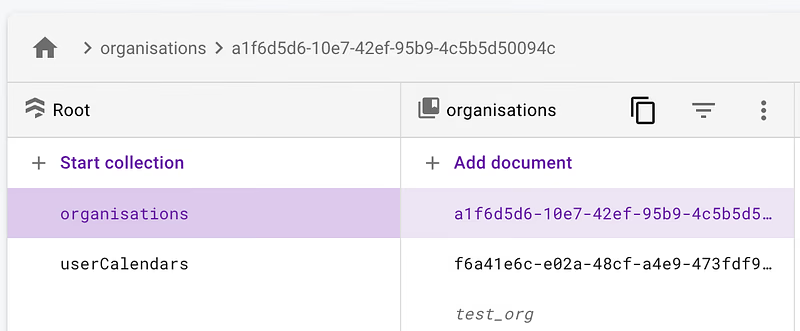
The document is a member of the collection. You can see I’ve added one here, test_org.
Adding Collections within Documents
If you want to add a new document, then add a subcollection to that document, and then add a document to that subcollection. You can do this by chaining:
db_ref = db.collection("your-collection-name").document("your-first-document").collection("sub-collection-name").document("your-second-document")
# Easier to see but not correct syntax
# db_ref = (
#   db.collection("your-collection-name")
#   .document("your-first-document")
#   .collection("sub-collection-name")
#   .document("your-second-document")
# )

db_ref.set({"your_data": "here"})
This works up to infinite chains (theoretically), and as long as you db_ref.set() something, everything in the chain will be created automatically.
Editing a Document that already exists
As before, chain your way to the Document’s location and call db_ref.set() on the document. You must know the collection names, subcollection names and intermediate document IDs.
That’s It
If you have any questions, drop them, and I’ll explain/ amend the article.