How Do MiniFlare’s SQLite Databases Work?
How does SQLite track R2 object storage and all other bits for local deployment?
When you run Cloudflare locally, it uses a tool called MiniFlare that mimics the Cloudflare live environment. It mimics APIs like the R2 API to help you develop locally. SQLite is used in this process to track storage. Each R2 bucket has a corresponding SQLite database that tracks object metadata, location, etc. But it’s not immediately clear from looking at the structure which SQLite database relates to which R2 bucket.
I started to look into exactly how this works because I wanted a Cloudflare development script that pulled my production R2 store into my local environment. This is a short post detailing how it works, and how I figured it out.
Stream of Consciousness
After some googling and LLM use, I’ve stumbled on this GitHub post:
A whole new storage... 🎁 · cloudflare miniflare · Discussion #525
It looks like the proposal that led the community to use the SQLite storage method, so hopefully it’s explained here.
It wasn’t
But it does explain the rough ideas behind how SQLite is used. Okay, moving on to something else.
The blobs
The blobs in the R2 buckets are the actual files. If I look, I can see that I always seem to have: 00000197df, but that occurs in all of my blobs, not just the ones from one bucket or the ones from another:
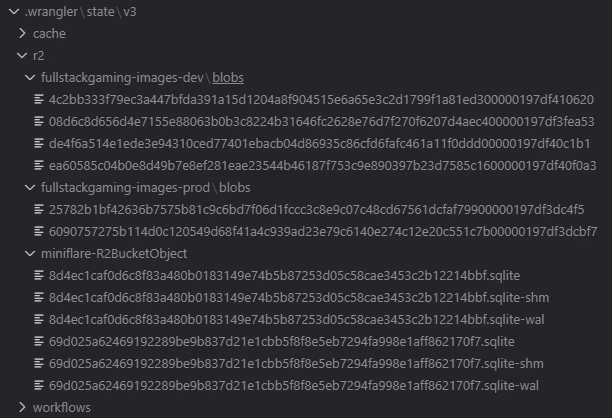
So that’s not of interest either.
Time to check out the Wrangler code
wrangler is the CLI tool Cloudflare provide for interacting with their services and running stuff locally in dev. It contains Miniflare. So here is some of the code:
workers-sdk/packages/wrangler/src/r2/object.ts at 7c55f9e1eac4fb0d53f9180a011172328296be16 ·…
This file in cloudflare is pretty useful. It shows the object.ts code which I believe is the code used to handle the CLI commands that put objects into R2 storage.
Figured It Out
The name of the database is derived from two things:
uniqueKey— A miniflare-scope-unique key for the type of “durable object” the database is tracking. In this case, for R2 the unique key isminiflare-R2BucketObject. You’ll notice that it is handily the name of the directory containing the databases.name— A unique name for your bucket. This could be something like:image-prod, orimage-dev, ormy-cat-pictures, etc.
These two things and combined into a single hash, using this exact code, taken from the Cloudflare’s GitHub:
function durableObjectNamespaceIdFromName(uniqueKey: string, name: string) {
That’s how the job is done, and that’s how, from a bucket name, you can know exactly where to look for the database name. Easy, peasy.
This is quite clever as it keeps all of the database names easily derivable from bucket names, and scoped to the type of resource Miniflare is trying to track.
Codeology
I trawled through a lot of crap to find this code, here’s what I ended up doing:
- Spent time looking for the CLI command to
putan object, presuming that it altered the SQLite table. I believe it does, but not in a way that’s obvious in code. - I switched tack and deleted the local versions of my R2 bucket, then remade them again. Each time, I checked if the name of the SQLite database held in
miniflare-R2BucketObjectwas the same for the same R2 bucket. It was consistently the same, which implied the name of the SQLite database is some sort of hash. - The length of the database name is 64 chars in hex, implying a 256-bit hash, which implies again:
sha256. - I tried
sha256on just the bucket name and that failed, but I was fairly sure this was the correct approach. - So I checked for locations where
crypto.hash(occurred in the source code. - That’s when I stumbled across the
durabelObjectNamespaceIdFromNamefunction. - Tracking it’s use, I found it inside of
migrateDatabaseand found the R2 version of that. - That allowed me to find the unique key, and then I guessed the name was just the bucket name, and it was!
Final Words
I hate not understanding stuff like this, which is why I went down this rabbit hole. This knowledge helps build dev tools that interact with Miniflare and is practically unknown online. Hopefully, it helps you if you fall into that niche camp!
A slight departure from my usual tutorials, if it’s too loose, I can write it up properly.