How To Build a Svelte 5 Component NPM Package
Learn how to create reusable Svelte 5 components and release them on NPM.
In this tutorial, you will learn:
- How to use
sv createto scaffold your package. - How to add a component.
- How to package and publish to NPM.
The path to publishing is simple thanks to the brilliant work of the Svelte team:
Prerequisites
This tutorial assumes you have the following:
- A Node package manager,
npmorpnpmare most common. - An account on NPM.
- Some terminal knowledge.
As long as you have these, you’re good to go.
Step 1 — Scaffold the Package
To scaffold your package, open a terminal. Navigate to the location where you want to store your package, then create a new directory named after your package. Here’s my example below:
mkdir svelte-social-login-buttons
cd into the directory, and then run the following:
npx sv create
This will start a terminal process that guides you through a multiple-choice list. The list defines your project structure and looks like this:
> npx sv create

┌  Welcome to the Svelte CLI! (v0.11.2)
│
◇  Where would you like your project to be created?
│  ./
│
◇  Directory not empty. Continue?
│  Yes
│
◇  Which template would you like?
│  Svelte library
│
◇  Add type checking with TypeScript?
│  Yes, using TypeScript syntax
│
◇  What would you like to add to your project? (use arrow keys / space bar)
│  prettier
│
◆  Project created
│
◆  Successfully setup add-ons: prettier
│
◇  Which package manager do you want to install dependencies with?
│
│  pnpm dlx sv create --template library --types ts --add prettier --install pnpm ./
│
◆  Successfully installed dependencies with pnpm
│
◇  What's next? ───────────────────────────────╮
│                                              │
│  📁 Project steps                            │
│                                              │
│    1: pnpm run dev --open                    │
│                                              │
│  To close the dev server, hit Ctrl-C         │
│                                              │
│  Stuck? Visit us at https://svelte.dev/chat  │
│                                              │
├──────────────────────────────────────────────╯
│
└  You're all set!
Each question has a diamond outline on the left-hand side. The answer you should give is below. For example:
Question:Which template would you like?Answer:Svelte library
When asked what you would like to add to your project, choose whatever group of tools you like. I selected prettier as my component library is simple.
When you complete this process, you will have the following folder structure (or something similar):
📁 ./
├── 📄 .gitignore
├── 📄 .npmrc
├── 📄 .prettierignore
├── 📄 .prettierrc
├── 📄 README.md
├── 📄 package.json
├── 📄 svelte.config.js
├── 📄 tsconfig.json
├── 📄 vite.config.ts
├── 📁 src/
│   ├── 📄 app.d.ts
│   ├── 📄 app.html
│   ├── 📁 lib/
│   │   └── 📄 index.ts
│   ├── 📁 routes/
│   │   └── 📄 +page.svelte
├── 📁 static/
│   └── 📄 favicon.svg
If you check inside the package.json you’ll see the name of the package is the name of the folder you created it in. Install all of the default dependencies with your package manager:
npm install
Add git source control with:
git init
Update your README.md, to explain the purpose of your package and how to use it.
A structural aside
If you’ve built SvelteKit sites before, you’ll notice a similarity. This is deliberate. Although I can’t find explicit documentation on why the structure is the way it is, I believe this is the reasoning:
- In order to produce good Svelte components, you need the Svelte and SvelteKit backend to process them.
- SvelteKit already has a well-designed project structure that the tooling expects and is set up to deal with.
- Therefore, to reduce tooling friction, the Svelte team adopted a similar project structure for producing Svelte libraries as NPM packages.
- Because NPM packages often have documentation websites, they left the
/routesdirectory in place and gave you an easy way to release a docs site and test your components.
If someone more in the know than I can confirm this, I would be very grateful.
Step 2 — Add a Component
To add components to your package, use the /src/lib directory, and export them from the index.ts file. So your /lib directory looks like this:
📁 lib/
├── 📄 AComponent.svelte
└── 📄 index.ts
and your index.ts file looks like this:
export { default as AComponent } from "./AComponent.svelte";
Step 3 — Build the Package
To create the NPM package, run the following:
npm pack
This will generate a /dist folder that can be published on NPM with all the appropriate types and Svelte 5 components.
What happens under the hood?
Look inside the package.json file in the root, you can see what this triggers:
{
  "scripts": {
    "dev": "vite dev",
    "build": "vite build && npm run prepack",
    "preview": "vite preview",
    "prepare": "svelte-kit sync || echo ''",
    "prepack": "svelte-kit sync && svelte-package && publint",
    "check": "svelte-kit sync && svelte-check --tsconfig ./tsconfig.json",
    "check:watch": "svelte-kit sync && svelte-check --tsconfig ./tsconfig.json --watch",
    "format": "prettier --write .",
    "lint": "prettier --check ."
  }
}
npm pack runs both prepare and prepack, but let’s focus on prepack as it does prepare’s job too. We have:
svelte-kit sync— This autogenerates types and creates thetsconfig.jsonfor your project.svelte-package— This is the packaging step; it creates.jsand.d.tsfiles from your.sveltecomponents.publint— A package linter that ensures maximum compatibility across environments.
Together, these generate the correct setup and packaged files for publication to NPM.
Step 4 — Publish to NPM
You can publish your /dist directory to NPM with:
npm publish
This will deploy your package to your NPM account:
https://www.npmjs.com/package/svelte-social-login-buttons
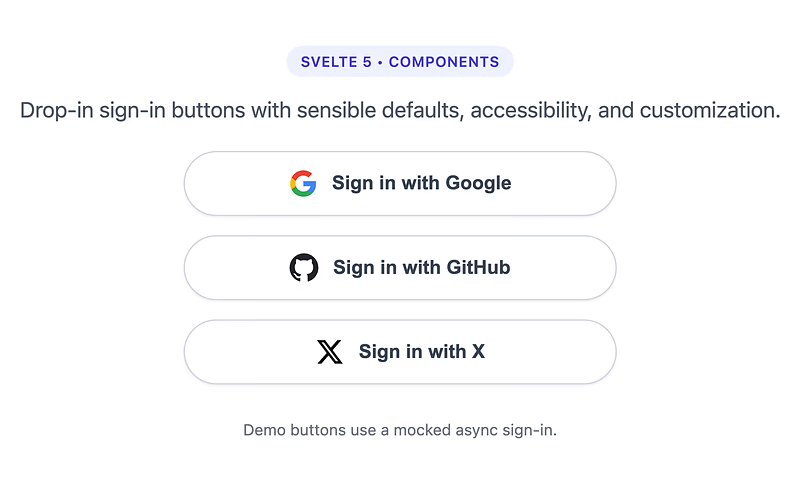
Congratulations! You have successfully released a Svelte 5 component package.
Final Words
I hope this helps you release components quickly and gets you using custom-built UI for all of your projects! Happy componenting.