What’s The Point of DNS Servers?
Pretty names for boring numbers.

I visited 216.58.212.206 today to prepare for this article. Yeah. Doesn’t quite have the same ring to it as:
I visited google.com today to prepare for this article.
But your browser basically treats the number and the name the same. Try it. Copy that weird string of numbers into your address bar and search it. Woah… Google! So what’s going on?
The string of numbers is an address for Google, like an internet postcode, called an IP Address. The address points to a physical location, a server, where your request is routed. This leads us to a larger question: how does the “Internet” know where that IP address points? If you’re not curious to fault, you can skip this bit.
How Do IP Addresses Point Anywhere?
Without getting bogged down in details, it works like this: The Internet runs on physical infrastructure. Companies that own and maintain that infrastructure are called Internet Service Providers. A Regional Internet Registry gives them sets of IP Addresses. These are typically not-for-profit organisations that track who has been given what numbers.
The ISP randomly assigns these IP Addresses to their clients' physical locations. Therefore, when requests to an IP address come onto the network, the ISP knows what physical location to route that request to. It can also let all the other ISPs know, if you get IP Address X, come to our network and we’ll sort it out.
Back to The Main Point
IP addresses are what your browser needs, but they’re terrible to remember. Google.com on the other hand, nice, simple, easy. That’s where DNS comes in. DNS stands for “Domain Name Server”. They themselves are servers, which hold a big table of names and the IP Addresses they connect to.
It works like this, you type a name into your browser’s address bar, say google.com:

Your browser doesn’t know where that points by default, so it sends a request to a different IP Address. The address of a Domain Name Server. That server looks up the name of your domain and, if it exists, sends back the IP Address that you’re looking for. It’s like the yellow pages of the internet.
If you’re on Chrome, you’re probably using your computer’s default DNS. You can check by clicking settings on Google:
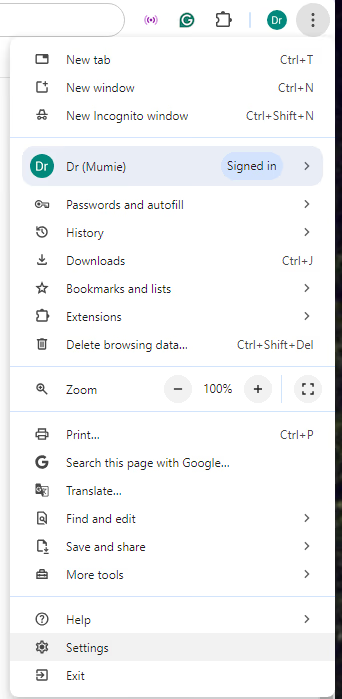
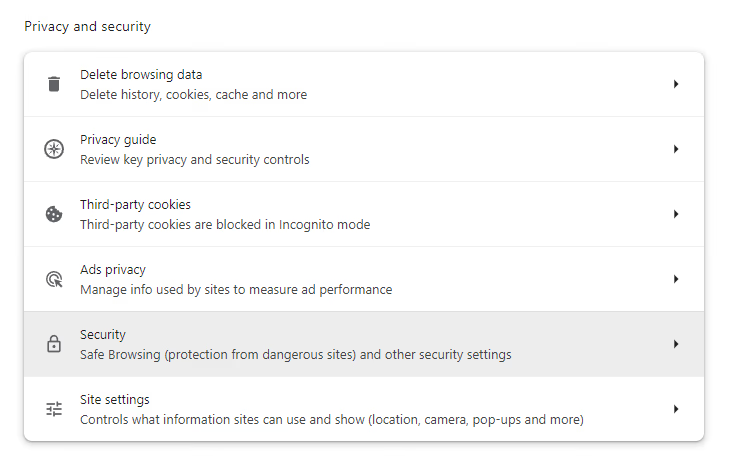
Going to Privacy and Security in the left hand pane, and selecting Security.
Scroll down, and you’ll see the available DNS providers:
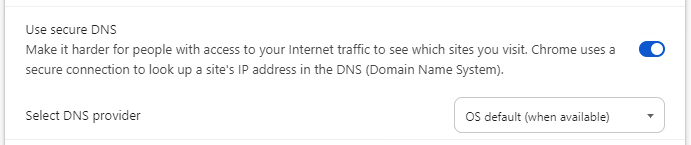
Changing this can completely change where a domain name points. Ultimately, a DNS server is just a table with names and IP Addresses attached. Nothing is stopping it from being deliberately wrong. That’s why there are a few big DNS providers that everyone trusts: Google, Cloudflare, OpenDNS, etc.
Wrapping Up
So what IS the point, then? It’s simple really, marketing, and ease. Domain names are much easier to remember and far more attractive. I’m not sure Google would have taken off if it was called: 216.58.212.206. Pretty, memorable names make money, and that’s about it!
I hope you’ve learned something new. I’m in the process of deploying a WordPress site on AWS, which is drawing me into all this tech. If that interests you, stick around, there’s more content coming.